The goal of this motion study on the continuum tentacle robot arm that I am developing, was to measure the relationship between tendon/cable movement and the movement of the being affected by the tendon tension.
I did a motion study of the continuum tentacle arm by setting up a couple web cameras on tripods from 2 different angles. One was pointing at the bottom where I manually pulled a couple tendons, and the second was pointing at the arm to capture the movement.
Then using some Python in a Jupyter notebook, I used some libraries I found, and merged frames into a single image.
I did this for multiple vertebrae disks along the spine, to see if there was any difference in motion depending on the termination point of the tendon cables.
Visualizing the Movement
Here's a gif of those images overlaid with red spheres added in Blender to show the termination points:
Blender has turned out to be great for this sort of thing – After trying to do the same thing in a proprietary video editor, I now prefer Blender for this sort of analysis.
I used the Python Blender scripting, with animation nodes, to extract location data from a hand-keyed sphere following the first vertebrae as the tendons were pulled.

Animation nodes setup in Blender for tracking movement
Note for next time:
Automatic keying of an attached colored tracker would be a better route to go next time as opposed to hand keying.
Data Analysis
Data was dumped to a CSV file, where it can then be processed/saved into a spreadsheet. I ended up revisiting the data processing part, and for what it is, it's in better shape.
Basically the data shows a significant change in arm movement when the tendon initially starts to move. The data is messy as the tendons were hand pulled and the point hand keyed, but it was a good learning experience for more than one skill.
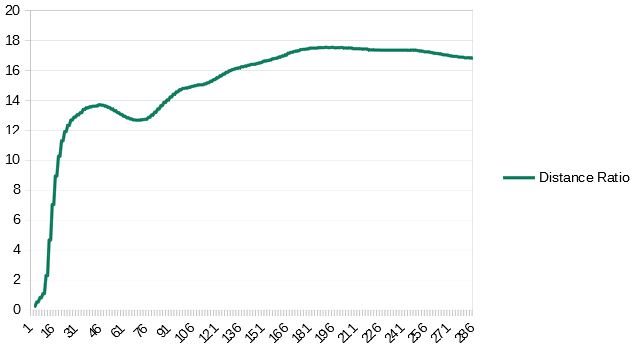
Distance ratio analysis
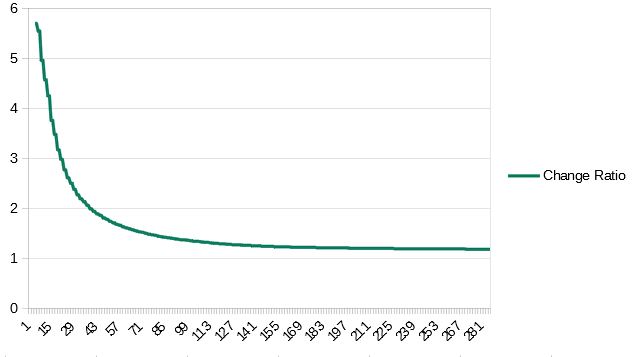
Change ratio visualization
Blender Python script for displaying data from Animation Nodes
import bpy
import csv


def data_handler(scene):
    frame_text = "Frame " + str(scene.frame_current)

    # get data
    vert_1_pos = scene.objects['vert_1_pos_Text'].data.body
    vert_1_pos_influance = scene.objects['vert_1_mv_ratio_Text'].data.body
    tendon_pull_distance = scene.objects['ctrl_dist_Text'].data.body

    position_data = str(vert_1_pos) + "," + str(tendon_pull_distance)
    position_data.encode('utf8')
    position_data = position_data.replace("\n","")

    scene.objects['output_text'].data.body = str(frame_text)

    # write to file
    csv_data_file = ("C:\\Users\\Jason\\Documents\\head_robotics\\open-tentacle\\0.1.1\\data\\open_tendon_videos\\1st_movment_study\\visual_arm_movement.csv")
    file = open(csv_data_file, 'a')
    file.write(position_data+'\n')
    file.close()

bpy.app.handlers.frame_change_pre.append(data_handler)